
AI grading, built for teachers
Grade a stack of
essays in the time
it takes for coffee.
Photograph the work, upload your rubric, and DraftGrade returns consistent scores and personal feedback for every student, ready to review before your next class.
Photosynthesis is when plants use sunliteSpelling from the sun to make food. The chlorophyll in the leaves captures the light energy and turns it into chemical energy+10 pts Correct process the plant can use.
Solid grasp of the core process: light energy becomes chemical energy, and you correctly connect chlorophyll to that. To push this further, name what's actually produced (glucose and oxygen) rather than just the energy analogy.
The problem
Grading is the job inside the job.
Most teachers plan for the classroom, not for the second shift that starts after the last bell. Rubric held in one hand, red pen in the other, hours disappear into a stack that never quite gets shorter.
Illustrative estimates based on commonly cited teacher workload figures, not a formal study of DraftGrade users.
See it for yourself
A real DraftGrade result, already graded and ready to review. No sign-up required.
Try demoWhat it does
Everything grading needs, nothing it doesn't.
DraftGrade fits into the workflow you already have. No new gradebook to learn, no student accounts to manage.
Rubric matching
Upload a PDF, DOCX, or pasted rubric. DraftGrade maps every criterion to what's on the page before it scores a thing.
Batch grading
Photograph an entire class set at once. Tell DraftGrade the pages are double-sided and it pairs them automatically.
Minutes, not days
A full class set comes back scored and annotated in the time it takes to plan tomorrow's lesson.
Feedback students read
Specific, encouraging comments tied to the rubric, not a generic pass or fail with no explanation.
Privacy by default
Student work isn't stored server-side. A built-in reminder prompts names to be covered before anything uploads.
Export in one click
Copy results into your gradebook or download the whole set as a clean, shareable report.
How it works
Four steps between you and a finished stack.
Photograph the papers
Snap each student's work with your phone or upload existing scans. Pages compress automatically.
Add your rubric
Paste it in or upload the file you already use. No reformatting required.
DraftGrade grades
Each paper is read, matched to the rubric, and scored with supporting notes.
Review and export
Skim the results, adjust anything you'd like, then copy or download the finished set.
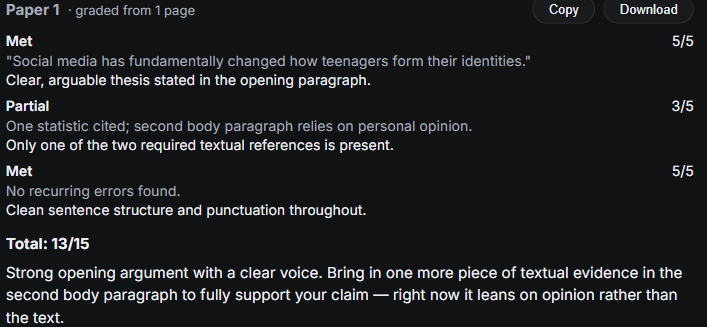
Product preview
A grading dashboard that stays out of your way.
One view for the whole class set: scores, rubric breakdowns, and feedback, laid out the way you'd mark it yourself.
Privacy
Built to keep student work private.
DraftGrade reads a photo, grades it against your rubric, and hands the result back to you. No student records are stored server-side.
Questions
Before you start grading
No. DraftGrade doesn't persist student work on our servers. Names should be covered before uploading, and the assistant is instructed to omit personally identifying details from anything it returns.
PDF, DOCX, and plain text all work, along with pasting a rubric directly into the box. No specific format or template is required.
Yes. DraftGrade is built around photographed handwritten work as the primary input, since that's what most classroom assignments look like.
No. Every score and comment is meant to be reviewed before it reaches a student. Think of it as a first pass, not a final word.
DraftGrade is built to satisfy FERPA's "school official" exception: student work isn't retained after grading, and nothing is redisclosed beyond generating the result. See the Privacy Policy for the full breakdown, or request a Data Processing Agreement directly.
Teachers already in the pilot keep free access for now. Pricing details will be shared as plans open up.
Get your evenings back this week.
Upload one class set and see what a finished stack of graded, feedback-ready papers looks like in minutes.
No credit card. No student sign-up required.